Long-Video Entity Memory Diagram (Editable PowerPoint)
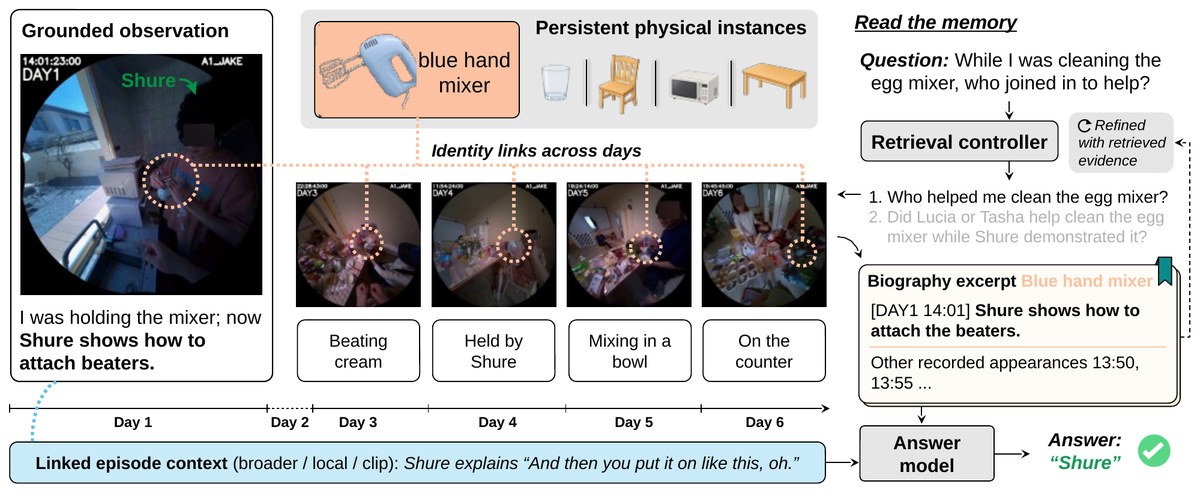
Overview
This editable PowerPoint diagram shows an entity-centric memory for long egocentric video, with a retrieval-controller QA loop. It is adapted from the original paper figure under CC BY 4.0.
What the diagram shows
On the left is a grounded first-person observation. In the middle, a persistent physical instance (a hand mixer) is linked across the Day 3 to Day 6 frames by dotted identity links, with an activity caption for each day. On the right, a "read the memory" loop runs from the question through a retrieval controller, sub-queries and a biography excerpt to the answer model. A Day 1–Day 6 timeline and a linked-episode-context bar run along the bottom. The boxes, arrows, dotted links, captions, timeline and QA loop are all native shapes, ready to restyle for your own slides, posters or papers.
File format
The download is a single-slide .pptx file measuring 11.55 × 4.75 in. It opens in PowerPoint, Keynote, WPS and LibreOffice Impress. Google Slides works too, although small layout shifts are possible. A full-resolution preview.png and a 1200 px web preview are included.
Shapes and editing
The file has 83 elements in total: 73 native editable shapes (19 auto-shapes, 20 text boxes, 25 lines or connectors and 9 freeforms) and 10 embedded raster images. You can edit all text, including bold, italic and colored runs, along with the rounded containers, the stacked biography card with its bookmark tab, the check-mark and refresh icons, the timeline ticks, the straight and curved arrows, the dotted highlight circles and the cross-day dotted links.
Embedded images and fonts
The 5 egocentric video frames (Day 1 and Day 3–Day 6) and the 5 small object pictures (hand mixer, glass, chair, microwave, table) are embedded PNG images. The highlight circles and the "Shure" label that sat on the frames were removed from the pixels and redrawn as shapes on top. The PNGs are at the source figure's resolution (roughly 100 px per inch on the slide), so they look soft if you blow them up. You can move, resize, crop or replace them, but you can't recolor or reshape them like vector shapes. The text uses Arial; without it, your app substitutes a similar sans-serif. This is a faithful redraw for reuse, not the authors' original source file.
Source & license Adapted from Figure 2 of Beyond the Timeline: Augmenting Long-Video Memory with Grounded Entity Biographies by Hui Ren, Lei Fan, Henry Pao, Han Guo, Zeeshan Zia, Ying Chen, Alexander Schwing, Gang Hua (arXiv:2609.38155, https://arxiv.org/abs/2609.38155; code: https://github.com/rhfeiyang/GEB). The original is licensed under CC BY 4.0 (https://creativecommons.org/licenses/by/4.0/). Converted to editable PowerPoint shapes; changes made by 叫我Alonzo就好了/alonzolab. Not endorsed by the original authors. Please keep the attribution (see LICENSE-ATTRIBUTION.txt) when you reuse the figure.