Looped MoE Transformer Flattened-Experts Diagram
Overview
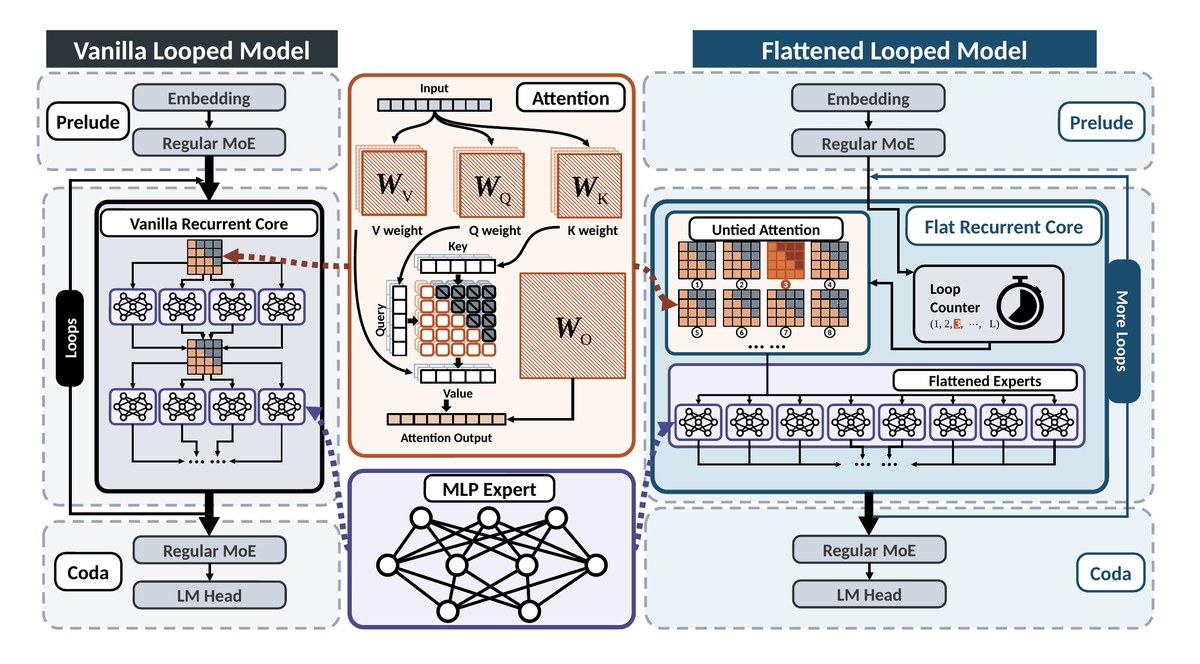
A side-by-side diagram of two looped (recurrent-depth) mixture-of-experts language models. It is an editable PowerPoint diagram adapted from the original paper figure under CC BY 4.0.
What the diagram shows
Left, a vanilla looped model: Prelude (embedding → regular MoE), a vanilla recurrent core with a shared attention block feeding two rows of four MLP experts, repeated by a Loops arrow, then Coda (regular MoE → LM head). Right, a flattened looped model with the same Prelude and Coda: its flat recurrent core holds untied attention (eight per-loop attention maps ①–⑧, the active loop highlighted), a loop counter (1, 2, 3, …, L) with a stopwatch icon and one row of eight flattened experts, wrapped by a More Loops arrow. Centre: zoom-ins of the attention block (input token row → WV, WQ, WK weight stacks, key / query / value token rows, a causal attention-score grid and WO → attention output) and of one MLP expert drawn as a small fully connected network, linked to both cores by dotted callouts. Every box, arrow, label and math term is a native shape you can recolor, resize and relabel for your own slides, posters or papers.
File format
The download contains .pptx (1 slide, 15.51 × 8.58 in; opens in PowerPoint, Keynote, WPS and LibreOffice Impress; Google Slides works too, but complex freeforms may shift slightly), .svg and .drawio. Includes preview.png (full resolution) and a 1200 px web preview.
Shapes and editing
The file has 664 native editable shapes: 511 auto-shapes, 15 text boxes, 138 freeforms, 0 lines/connectors. No embedded images. Everything is vector. You can edit all text and math (WV, WQ, WK, WO, the loop counter (1, 2, 3, …, L)), every token cell and attention-score cell, the hatched weight stacks, the eight per-loop attention mini-grids with circled numbers, every expert icon and the MLP expert network, the stopwatch icon, the dashed Prelude / Coda / core panels, the Loops and More Loops bars, the dotted callouts and all connectors.
Embedded images and fonts
This file has no embedded images; everything is vector. Body text uses Calibri and formulas use Times New Roman. Calibri ships with Microsoft Office and Times New Roman is preinstalled on Windows and macOS (LibreOffice substitutes the metric-compatible Carlito and Liberation Serif). The midline ellipsis ⋯ in the loop counter uses Cambria Math, which ships with Microsoft Office; other apps substitute a math font. Sub- and superscripts are real formatted text runs, not equation objects. The SVG keeps text as text; the draw.io file is a shape-by-shape conversion and may need small nudges. This is a faithful redraw for reuse, not the authors' original source file.
Source & license Adapted from Figure 2 of How to Loop MoE: Flatten the Experts, Untie the Attention by Shouren Wang, Chuang Ma, Mohsen Hariri, Debargha Ganguly, Wang Yang, Xiaoqing Tong, Qianying Liu, Xiaotian Han, Vipin Chaudhary (arXiv:2609.35751, https://arxiv.org/abs/2609.35751). Licensed under CC BY 4.0 (https://creativecommons.org/licenses/by/4.0/). Redrawn as editable shapes; changes made by 叫我Alonzo就好了/alonzolab. Not endorsed by the original authors.
Questions or feedback? Email [email protected]